CSV Waterfall Match Rate Troubleshooting: How to Fix Domain Mismatches & not_found Rows
Direct Answer & 0-Credit Refund Scope Guarantee
When a multi-provider email waterfall returns an unusually high number of not_found rows, the bottleneck is almost always CSV input hygiene—specifically raw URLs in the domain column, corporate legal suffixes without a bare domain, personal webmail addresses, merged/credentialed name fields, duplicate entries, or catch-all-heavy enterprise lists. Your credits are protected either way: EmailWaterfall automatically refunds every not_found, undeliverable, and upstream-timeout row to 0 credits charged with an idempotent ledger receipt (refund-row-<id>). Cleaning your CSV locally before uploading ensures your first run captures the maximum usable verified yield without needing repetitive cleanup passes.
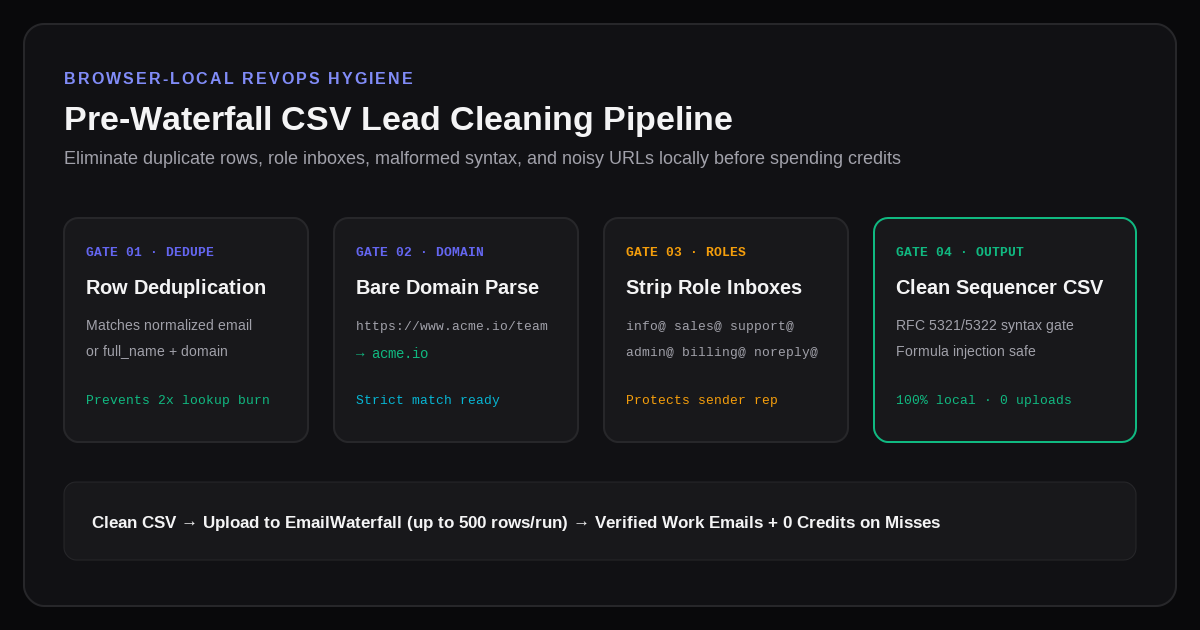
1. Symptom-to-Fix Diagnostic Table (6 CSV Failure Modes)
Use this table to diagnose why specific rows resolved as not_found or catch_all in your export. Every pattern below maps directly to a concrete pre-upload fix.
| CSV Failure Mode / Symptom | Typical Raw Example | Why Match Rate Drops | Exact Fix |
|---|---|---|---|
| https://www. or URL path strings inside the domain column | https://www.linearitycloud.io/pricing?utm=nav | Strict domain matching or upstream company lookups fail to align hostnames when protocols, paths, or query strings leak into raw exports. | Strip scheme, www., ports, paths, and query parameters down to a bare lowercase root domain (linearitycloud.io) in the Free CSV Lead Cleaner. |
| Corporate legal suffixes in company column without a clean domain | Vektor Analytics, Inc. (DBA Vektor) / Acme GmbH / Northstar Ltd. | When a row relies on company-name resolution, legal suffixes, parenthetical DBAs, and punctuation break exact entity matching across B2B indexes. | Supply the canonical bare company domain column alongside a clean brand name stripped of Inc., LLC, Ltd., Corp., and GmbH. |
| Personal webmail or shared role addresses mixed into B2B rows | founder@gmail.com, sales@vektoranalytics.com, info@company.io | Strict B2B domain enforcement rejects consumer webmail (Gmail, Yahoo, Outlook), while shared role inboxes drive spam complaints and hurt DMARC reputation. | Remove consumer webmail domains and toggle role-prefix stripping in the Free CSV Lead Cleaner before uploading to the waterfall. |
| UTF-8 BOM header corruption or merged Full Name with credentials | \uFEFFFull Name -> "Dr. Priya Nair, MBA" or "Chen, Marcus" | Spreadsheet exports with a hidden byte-order mark can break naive header matching, while titles (Dr., CPA, PhD) or reversed Last, First strings confuse local-part permutation checks. | Export clean UTF-8 CSVs, split into explicit first_name and last_name columns, and strip honorifics, middle initials, and credentials. |
| Duplicate prospect rows with whitespace or casing variations | " Hannah Alvarez " and "hannah alvarez" across two CSV exports | Duplicates consume slots inside the 500-row bulk batch limit and clutter sequencer imports even though EmailWaterfall caches hits for 30 days in D1. | Run local deduplication and whitespace trimming in the Free CSV Lead Cleaner before batching. |
| Catch-all heavy enterprise domains (accept-all mail gateways) | Microsoft 365 / Proofpoint enterprise accounts returning 250 OK | SMTP servers accept any local part during verification, increasing catch_all share and risking delayed bounces if sequenced blindly from primary domains. | Export verified rows for primary SPF/DKIM/DMARC domains; quarantine catch_all rows into separate warmed secondary inboxes or multi-channel LinkedIn outreach. |
2. Weak CSV Row vs Controlled Clean CSV Rewrites
Input-Hygiene Starting Patterns (Illustrative Examples): The four before-and-after rows below demonstrate controlled CSV rewrites you can apply to raw CRM or Sales Navigator exports so every upstream waterfall provider receives unambiguous contact and domain inputs.
| Hygiene Pattern | Weak Raw CSV Row | Controlled Clean Rewrite | Why It Helps |
|---|---|---|---|
| Pattern 1 · URL path & whitespace cleanup | Hannah Alvarez , Linearity Cloud , https://www.linearitycloud.io/about?ref=nav , | first_name=Hannah, last_name=Alvarez, domain=linearitycloud.io, company=Linearity Cloud | Bare lowercase hostname matches strict server-side domain rules without protocol or path noise. |
| Pattern 2 · Legal suffix & missing bare domain fix | Marcus Chen, "Vektor Analytics, Inc. (US)", www.vektoranalytics.com/demo, | first_name=Marcus, last_name=Chen, domain=vektoranalytics.com, company=Vektor Analytics | Removes punctuation/legal suffix ambiguity and anchors every waterfall provider to the root domain. |
| Pattern 3 · Merged credentialed name + personal webmail removal | "Nair, Dr. Priya (PhD)", Stackforge AI, stackforge.ai, priya.nair@gmail.com | first_name=Priya, last_name=Nair, domain=stackforge.ai, company=Stackforge AI | Splits reversed name, removes honorific/credential tokens, and drops personal Gmail so B2B verification targets stackforge.ai. |
| Pattern 4 · Deduplicated row with LinkedIn disambiguator | David Kim, Northstar Systems, northstarsystems.io (appears 3× with no LinkedIn URL) | first_name=David, last_name=Kim, domain=northstarsystems.io, linkedin_url=https://linkedin.com/in/david-kim-northstar | Eliminates duplicate batch rows and uses linkedin_url to disambiguate common names at larger accounts. |
3. Pre-Upload CSV Hygiene Packet Checklist (4 Actionable Checks)
Run every prospect export through these four quick checks before uploading to the bulk workbench. Steps 1, 3, and 4 execute directly inside our free browser-local tools with zero server upload.
Check 1 · Bare Domain & Role-Inbox Sweep
Open the Free CSV Lead Cleaner to convert URLs like
https://www.company.io/abouttocompany.ioand strip shared inboxes (info@,sales@,support@).Check 2 · Explicit UTF-8 Name & Domain Headers
Verify your header row uses clean columns (
first_name,last_name,domain, optionallinkedin_url) and strip credentials (Dr.,MBA,PhD) from name cells.Check 3 · Deduplication & Personal Webmail Quarantine
Remove duplicate prospect rows and filter out consumer webmail domains (Gmail, Yahoo, Outlook) using the CSV Lead Cleaner so strict B2B domain validation only processes active corporate domains.
Check 4 · Split into 100–500 Row Domain Cohorts
Use the Free CSV Domain & Lead Batch Splitter to slice large files into 100, 250, or 500-row batches (or group accounts by domain) so every upload stays cleanly within the 500-row workbench limit.
4. Batch Sizing, Catch-All Quarantine & Smart Re-Run Strategy
Pilot-first batch sizing: Even though the bulk workbench accepts up to 500 rows per upload, RevOps teams enriching a brand-new list source should slice a 100-row pilot batch first with the CSV Domain Splitter. Inspect the verified, catch_all, and not_found breakdown plus the per-row winning provider (served_by) before running the remaining slices.
Catch-all quarantine rule: Under RFC 5321, accept-all enterprise gateways reply 250 OK regardless of whether a specific inbox exists. Always export verified rows into your flagship SPF/DKIM/DMARC-aligned sending pool, and route catch_all rows to low-volume secondary warmed domains or LinkedIn touches so hard-bounce spikes never damage primary domain reputation.
Zero-waste re-run protocol for misses: Because every not_found row was already refunded to 0 credits—and previously found leads sit in our 30-day Cloudflare D1 deduplication cache—you can filter your exported CSV down to not_found rows only, check whether those accounts use a subsidiary domain or recently changed employers, add linkedin_url where missing, and upload just the repaired mini-batch.
Fix Your CSV & Run a Clean Waterfall Batch
Clean & Deduplicate CSV Locally ($0)
Normalize bare domains, strip role emails (info@, sales@), and remove duplicate rows in your browser.
Split Into 100, 250, or 500-Row Batches
Slice large TAM exports into workbench-ready batches or group prospects by company domain at $0.
Upload Clean CSV to Bulk Workbench
Inspect the 27-lead sample table or upload up to 500 cleaned rows with strict domain matching and 0-credit miss refunds.
CSV Match Rate Troubleshooting FAQ
Do not_found or undeliverable rows burn credits when my CSV has formatting issues?
No. Before querying the waterfall, EmailWaterfall atomically reserves 1 credit per lead row and automatically refunds 1 credit (refund-row-<id>) for every row that finishes as not_found, undeliverable, or hits an upstream timeout. Fixing CSV hygiene before upload simply raises usable verified yield on your first run so you do not have to clean and re-upload misses.
Why does a prospect return not_found even when I know they work at the company?
The most common causes are a dirty domain cell containing https://www. or a sub-path, a subsidiary or parent-brand domain mismatch (for example parentgroup.com vs productbrand.io), merged name prefixes or credentials such as Dr. or MBA, or a recent job change where adding linkedin_url helps providers disambiguate the active employer.
Why are so many enterprise rows tagged catch_all instead of verified?
Large enterprise mail gateways—especially Microsoft 365 and Proofpoint configurations—respond 250 OK to any RCPT TO probe under RFC 5321 to block directory harvesting. EmailWaterfall flags these honestly as catch_all so you can send verified rows from your primary outbound domains and test catch_all rows conservatively on isolated secondary inboxes.
What CSV columns and batch size give the highest first-pass waterfall match rate?
Include clean UTF-8 headers for first_name, last_name, and a bare lowercase company domain (domain), plus linkedin_url whenever available for common names. Keep bulk uploads at or below 500 rows per batch—or split large lists into 100 to 250-row domain-grouped cohorts using our free CSV Domain Splitter to inspect match quality before enriching the rest of your list.
Technical Standards & Compliance References
- IETF RFC 5321 — Simple Mail Transfer Protocol (SMTP)
Defines live recipient verification codes (250 OK vs 550 permanent user-unknown bounce) and explains catch-all mail server acceptance behavior.
- IETF RFC 5322 — Internet Message Format
Specifies valid local-part and domain-part email syntax rules used to reject malformed cells before enrichment or sequencing.
- IETF RFC 7489 — DMARC Domain-Based Email Authentication
Establishes domain reputation alignment principles showing why quarantining catch-all and role-account bounces protects primary outbound domains.
- FTC CAN-SPAM Act Compliance Guide for Business
Federal commercial email requirements governing lawful B2B outreach, transparent headers, and honoring suppression requests.